Jackpot Game Gold 3D Text Effect: Your Secret Weapon for High-Impact Design
There is a specific moment in the design process where you realize standard typography just isn't cutting it. You need impact. You need dimension. You need the viewer to stop scrolling and pay attention. This is exactly where the Jackpot Game Gold 3D Text Effect steps in. It isn't just a font file; it is a fully editable vector design asset that mimics the luxurious, high-stakes aesthetic of a winning slot machine or a blockbuster movie title. If you are looking to inject instant prestige and excitement into your visual identity, this is the tool you need in your kit.
Visual Characteristics and Personality
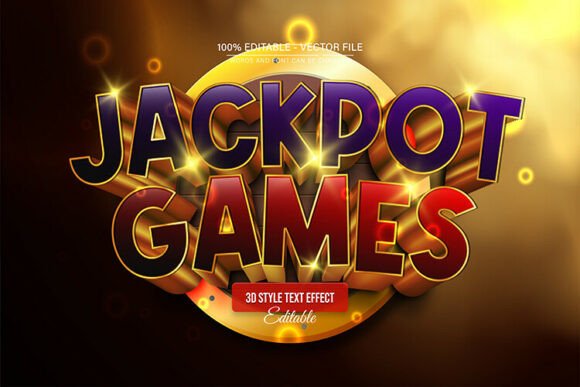
Let’s talk about the look. The Jackpot Game Gold 3D Text Effect is unapologetically bold. It features a deep, rich gold finish that catches light in a way that suggests weight and value. The 3D extrusion gives the letters significant depth, creating hard shadows and sharp edges that make the text pop off the background. It feels heavy, metallic, and expensive.
However, the true power of this asset lies in its construction. Because it is a fully editable vector design, you are not stuck with a static image. You can enlarge or reduce the size in Adobe Illustrator without the quality ever decreasing. This means whether you are designing a tiny favicon for a website or a massive banner for a trade show, the lines remain crisp, and the "gold" texture stays sharp. It projects a personality of luxury, victory, and high energy, making it perfect for projects that need to scream "winner."
Practical Applications: Where to Use This Style
As a designer or business owner, knowing when to use a display font is just as important as knowing how to use it. The Jackpot Game Gold 3D Text Effect is a specialized tool, and while it is versatile in its editability, its visual voice is loud. Here is where it truly shines:
- Event Branding: Think New Year’s Eve parties, casino nights, fundraisers, or awards ceremonies. This effect instantly sets a tone of celebration and exclusivity.
- Gaming and Entertainment: If you are designing assets for a YouTube channel, a Twitch stream, or mobile game graphics, this style captures that "high score" dopamine hit.
- Social Media Marketing: In a crowded feed, you need contrast. Use this for sale announcements, Black Friday promotions, or contest giveaways. The gold sheen stops the thumb-scroll immediately.
- Publishing and Editorial: Book covers for thrillers, action, or fantasy genres often rely on dimensional typography to convey drama. This vector effect is perfect for titles that need to dominate the cover art.
- Product Packaging: For specialty items, limited edition runs, or luxury goods, the gold 3D look communicates premium quality before the customer even reads the ingredients.
Strategic Impact on Brand Perception
Typography does more than spell out words; it creates a psychological anchor for your audience. When you apply the Jackpot Game Gold 3D Text Effect to your logo design or marketing materials, you are leveraging modern typography to influence how your brand is perceived.
First, it establishes visual hierarchy. Because this is a display font style with high contrast and dimension, it naturally sits at the top of the visual food chain. It draws the eye to the headline or the main offer, allowing you to pair it with a cleaner sans serif font for the body text to maintain readability. This balance ensures your message is understood while the emotional impact is preserved.
Second, it boosts brand recognition. A standard font is forgettable; a metallic, 3D effect is memorable. By using this style consistently for specific campaigns or recurring events (like a monthly "Gold Tier" sale), you create a visual shorthand for your audience. They recognize the "gold" text as a signal for something valuable or exciting happening.
Technical Mastery: Editability and Workflow
One of the biggest hurdles with 3D text effects in the past was the lack of flexibility. You were often given a flat JPEG where changing a single letter meant re-creating the effect from scratch. This asset changes the game because it is 100% editable.
The download includes both EPS and JPG formats, but the real magic happens in the Adobe Illustrator file. The text is fully editable, meaning you aren't just changing the image; you are manipulating a live vector object. You have unlimited color variations available to you. While "Jackpot Gold" is the default, you can easily shift the hue to create silver, bronze, or even neon cyber-punk variations depending on your project needs. This makes it a versatile design asset rather than a one-trick pony.
How to Implement the Effect
You do not need to be a motion graphics wizard to use this. The workflow is designed to be intuitive, even for those with basic design skills. The creators have stripped away the complexity of building 3D bevels and lighting effects manually.
- Open the File: Start by opening the file in Adobe Illustrator CS or higher.
- Select the Text: Press "T" on your keyboard to activate the Type Tool, then click on the text you wish to modify.
- Edit and Customize: Type your new headline. You will see the gold 3D effect apply instantly to your new words. From here, you can resize, color shift, or distort the text to fit your layout.
This process allows you to focus on the creative strategy—choosing the right words and layout—rather than getting bogged down in technical rendering. It bridges the gap between a high-end concept and a practical, professional result.
Final Thoughts on Creative Assets
In the world of design assets, versatility and quality are king. The Jackpot Game Gold 3D Text Effect delivers on both fronts. It provides a high-gloss, professional aesthetic that can elevate a simple project into something spectacular. Whether you are a small business owner looking to jazz up a newsletter, a content creator needing a killer thumbnail, or a designer working on a high-stakes branding project, this vector effect offers a reliable way to bring that "jackpot" feeling to your work. It is not just about making text look like gold; it is about making your message feel valuable.